
Smarter Storage
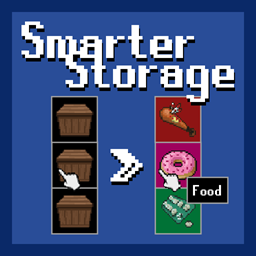
Declutter Your Survivor Experience with Smarter Storage for Project Zomboid
Tired of the endless inventory shuffle and the visual chaos of your meticulously organized loot rooms in Project Zomboid? The Smarter Storage mod offers a streamlined, vanilla+ approach to container management that will revolutionize how you interact with your hard-won supplies. This intuitive mod introduces a simple yet powerful system for customizing your storage, ensuring you can find exactly what you need, when you need it, without the usual frustration.
Effortless Organization at Your Fingertips
Smarter Storage empowers you to personalize every container. Say goodbye to generic icons and endless scrolling. With a simple right-click on any container’s button, you unlock a suite of options designed to bring order to the apocalypse.
- Edit: Tailor the appearance of any container button. Change its name to something descriptive, assign a unique icon that instantly communicates its contents, and even apply a custom color for a quick visual cue.
- Presets: Instantly apply pre-designed styles to common loot types. Whether it’s food, medicine, tools, or ammunition, Smarter Storage provides ready-made templates to get you organized in seconds.
- Reset: If you change your mind or want to revert to the default Project Zomboid appearance, the reset option is always available.
Transform Your Loot Management
Imagine walking into your base and instantly knowing which container holds your medical supplies, which is stocked with food, and which is reserved for crafting materials. Smarter Storage makes this a reality. The ability to quickly assign custom names, visually distinct icons, and color-coding means less time spent searching and more time surviving. The preset system is a fantastic time-saver, allowing for rapid organization, while the detailed edit window provides the flexibility for truly unique setups.
Seamless Integration and Compatibility
One of the standout features of Smarter Storage is its ease of integration. This mod is designed to be added to or removed from existing saves without causing any issues, offering unparalleled flexibility for your Project Zomboid adventures. It has also been reported to function smoothly in multiplayer environments. While Smarter Storage strives for broad compatibility, it’s worth noting potential conflicts with specific mods that heavily alter UI elements related to inventory and containers. Always check the latest compatibility information for the most up-to-date details. Embrace a more organized and efficient Project Zomboid experience with Smarter Storage.