
Show Exact Level Number
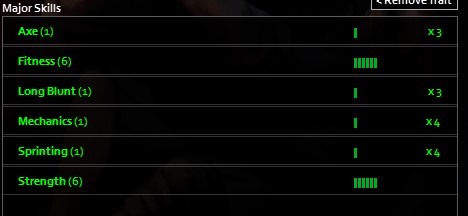
Project Zomboid: Precision Skill Display with Show Exact Level Number Mod
In the unforgiving world of Project Zomboid, every detail matters. From the precise moment you need to craft a crucial item to understanding your true combat readiness, knowing your exact skill level can be the difference between survival and becoming another shambling horror. The “Show Exact Level Number” mod injects a vital layer of clarity into your user interface, offering a granular view of your character’s proficiencies.
Unlock True Skill Insight
Tired of hovering over your skills and seeing vague progress bars or approximations? This intuitive mod eliminates that ambiguity. Once installed, you’ll see the precise numerical value of each skill you’ve invested time and effort into. Whether you’re a seasoned survivor meticulously tracking your carpentry progression or a new player trying to gauge their early-game farming expertise, this mod provides the exact data you need to make informed decisions.
Seamless Integration for All Survivors
Designed with both solo adventurers and multiplayer groups in mind, the “Show Exact Level Number” mod functions flawlessly across all your Project Zomboid experiences. The clarity it provides is invaluable, allowing for better coordination and strategy in multiplayer servers where understanding teammate capabilities is paramount. For single-player escapades, it offers a satisfyingly precise way to monitor your character’s growth and plan your development path.
Key Features at a Glance:
- Displays exact numerical skill levels in the UI.
- Enhances gameplay clarity for all player types.
- Works seamlessly in both single-player and multiplayer modes.
- Provides precise data for strategic character development.
Enhanced Compatibility
For an even more refined experience, the “Show Exact Level Number” mod is compatible with other UI enhancement mods. Specifically, when using the “Fix XP View” mod, ensure that “Show Exact Level Number” is loaded *after* it in your mod order. This guarantees optimal functionality and a clean, informative interface, allowing you to focus on what truly matters: surviving the zombie apocalypse.