
PZ-ClothingUI – Clothing items grid view (B41 + B42 Updated)
Revolutionize Your Inventory Management in Project Zomboid with PZ-ClothingUI
Tired of sifting through your inventory to manage your survivor’s attire in Project Zomboid? The PZ-ClothingUI mod offers a streamlined, visual approach to handling equipped clothing items, enhancing your gameplay experience. This mod introduces a dedicated grid view for all your garments, making it easier than ever to see what you’re wearing, switch outfits, and keep your survivor protected from the elements and zombie bites.
Key Features for Enhanced Gameplay
PZ-ClothingUI is designed with the busy survivor in mind. Its intuitive interface provides several powerful features:
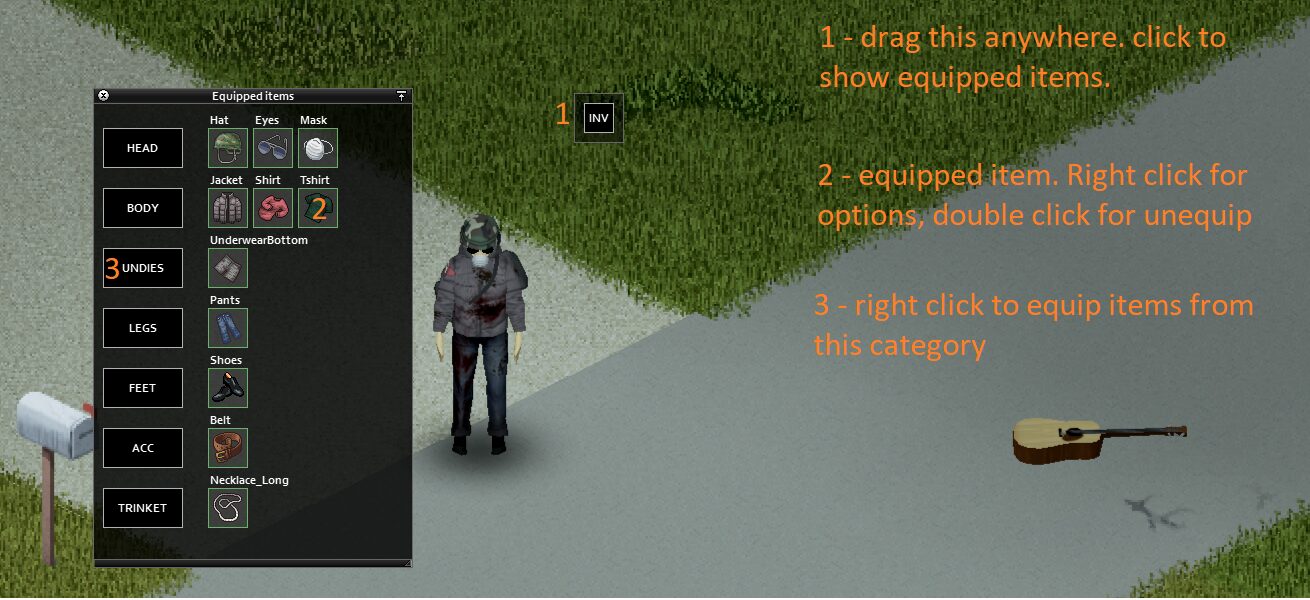
- Draggable Overview Window: Easily access a comprehensive view of your equipped clothing by dragging the dedicated button (grab the grey border!).
- Categorized Item Display: Your clothing is neatly organized into categories, allowing for quick identification. Right-clicking a category button or an item icon reveals equip possibilities.
- Quick Unequip: Double-left-clicking an item icon allows for rapid removal, saving precious seconds in a crisis.
- Informative Tooltips: Hover over any item to see detailed information without needing to open separate menus.
- Configurable Hotkey (Build 42+): For those running the latest builds, a customizable hotkey lets you toggle the clothing UI window on and off with ease.
Customization and Configuration
Tailor PZ-ClothingUI to your specific needs. Configuration is handled through the integrated Mod Options menu, which is highly recommended, especially for players using resolutions other than standard Full HD. To configure, simply enable the Mod Options mod, load into a single-player game, and navigate to the Mods tab within your game settings. You can then adjust the settings to your preference. Importantly, your configuration will be loaded even if the mod isn’t active on a multiplayer server, allowing you to set up your preferred view before joining your friends.
Multiplayer and Localization
PZ-ClothingUI fully supports multiplayer gameplay, provided the server administrator has enabled the mod. Furthermore, the mod boasts an impressive range of language support, including English, Russian, Chinese, German, Spanish, French, Brazilian Portuguese, Thai, and Turkish. This dedication to localization ensures that survivors worldwide can benefit from a more organized and visually appealing way to manage their clothing.