
Mutie’s Context Menu Icons
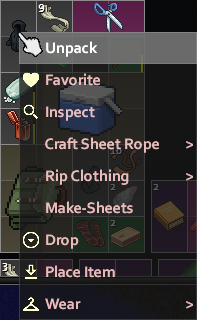
Enhance Your Project Zomboid Inventory Management with Context Menu Icons
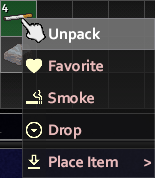
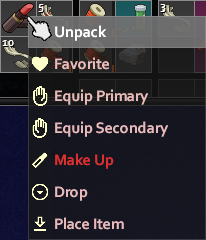
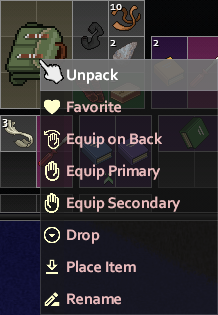
Navigating the harsh realities of Project Zomboid can be a challenge, especially when you’re juggling a multitude of items in your inventory. For those seeking a more intuitive and visually guided experience, the “Mutie’s Context Menu Icons” mod offers a simple yet highly effective solution. This mod seamlessly integrates helpful icons directly into your game’s context menus, making item interaction quicker and more efficient.
Streamlining Item Interactions
The core functionality of this mod is its ability to add clear, recognizable icons to various actions available when you right-click on items. This visual cue eliminates the need to meticulously read every menu option, especially during high-pressure situations. Whether you’re looting a ransacked building or preparing for a zombie horde, having instant visual feedback for actions like attaching, drinking, dropping, eating, or equipping items can save precious seconds and reduce cognitive load.
Key Features at a Glance
The “Mutie’s Context Menu Icons” mod enhances a wide array of context menu options, providing visual aids for actions such as:
- Attaching items (both in inventory and on the hotbar)
- Consuming beverages (including selective amounts)
- Dropping items efficiently
- Ingesting food (with quantity options)
- Equipping gear in various slots (primary, secondary, dual-wield, backpack)
- Favoriting and unfavoriting items
- Inspecting clothing for durability and protection
- Applying cosmetic changes
- Placing items in the world
- Reading books and notes
- Renaming containers, maps, and food items
- Smoking consumables
- Unequipping gear
- Wearing clothing items
- Interacting with your environment (sitting, sleeping, walking to points of interest)
- Operating appliances and switches
Broad Compatibility and Multilingual Support
Designed with compatibility in mind, this mod should work harmoniously with most other Project Zomboid modifications that alter context menu options. The developer actively encourages players to report any compatibility issues they encounter. Furthermore, the mod intelligently utilizes the game’s built-in translation strings, ensuring that the icons correspond correctly to menu options regardless of the language you play in. This means a truly universal enhancement for any Project Zomboid player.