
Darker Map
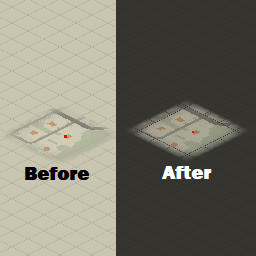
Darker Map: A Project Zomboid Visual Enhancement
For survivors in Project Zomboid, navigating the world is a constant challenge. While the game’s atmosphere is a key part of its appeal, certain visual elements can sometimes detract from the immersion. One such element, particularly for those who prefer a more subdued aesthetic, is the default map interface. This is where the Darker Map mod comes into play, offering a welcome visual overhaul for your in-game maps.
Embrace the Darkness
The primary goal of the Darker Map mod is to provide a more visually comfortable and immersive map experience. Instead of the bright, sometimes jarring default map screen that can feel like a sudden flash, this mod introduces a significantly darker theme. This “dark mode” is perfect for players who find the standard map illumination disruptive, especially during prolonged gaming sessions or when playing in low-light environments.
Key Features of Darker Map
This mod focuses on a specific, yet impactful, aspect of the Project Zomboid UI. Here are some of the key benefits you can expect:
- Reduced screen glare when accessing the map.
- A more immersive, thematic visual style for map navigation.
- Enhanced comfort for extended play sessions.
- Compatibility with the latest Project Zomboid updates.
A Subtle Yet Significant Improvement
The Darker Map mod is a testament to how small changes can significantly improve the overall gaming experience. By tweaking the map’s visual presentation, it allows players to focus more on planning their routes, identifying points of interest, and strategizing their next move, all without the distraction of a glaring interface. Whether you’re a long-time Project Zomboid veteran or a newcomer to the zombie-infested world, this mod offers a simple yet effective way to enhance your visual comfort and deepen your immersion in the game.