
Chat Bubble v0.6 (Build 41mp)
Enhance Your Project Zomboid Multiplayer with Chat Bubbles
Tired of messages getting lost in the digital ether during intense Project Zomboid multiplayer sessions? Introducing the Chat Bubble mod, a simple yet effective addition designed to make communication clearer and more intuitive when you’re surviving the zombie apocalypse with friends. This mod brings a classic visual element to your game, ensuring you and your fellow survivors can stay connected without missing a beat.
See Who’s Talking, Instantly
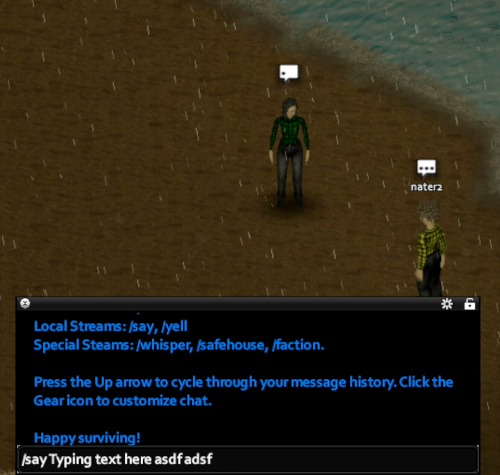
The core functionality of the Chat Bubble mod is elegantly straightforward. As soon as you begin typing a message in multiplayer, a small, unobtrusive chat bubble will appear directly above your survivor’s head. This provides immediate visual feedback, letting anyone nearby know you’re trying to communicate. No more wondering if someone is just standing there or actively trying to convey vital information about incoming hordes or a potential safehouse.
Key Features for Smoother Communication:
- Visual Chat Indicators: Chat bubbles appear above players’ heads when they are typing in multiplayer.
- MP-Focused Design: Specifically tailored for the multiplayer experience in Project Zomboid.
- Seamless Integration: Works without requiring a new game save; safe to add or remove from existing playthroughs.
- Admin Tab Exemption: Chat bubbles are intelligently disabled when you are in the ‘Admin’ tab, preventing visual clutter during administrative tasks.
- Range Visibility: Messages within bubbles are visible from the same range as standard ‘/say’ commands, ensuring messages reach their intended audience.
Technical Details and Compatibility
The Chat Bubble mod is designed with compatibility and performance in mind. It leverages existing in-game functions for player speech to display the chat bubbles. Crucially, if the chat text box is empty, no bubble will appear, and the mod automatically deactivates itself in single-player mode, meaning no unnecessary processes run when you’re playing solo. This thoughtful implementation ensures that your Project Zomboid experience remains smooth and enjoyable, whether you’re coordinating defenses or simply sharing scavenging finds.
While the mod generally works without issue, there are a couple of minor known behaviors. Image messages might briefly reappear in the chat log under certain conditions until a new message is sent, and image messages are visible in server logs. These are minor quirks that do not significantly impact gameplay. Enjoy a more connected survival experience with the Chat Bubble mod!