
Big Progress Bar
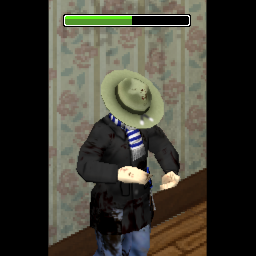
Enhance Your Project Zomboid Experience with Big Progress Bar
In the brutal world of Project Zomboid, every second counts, and clear visual feedback is crucial for survival. Whether you’re crafting essential items, tending to injuries, or bracing for a horde, understanding the progress of your actions can mean the difference between life and death. This is where the “Big Progress Bar” mod steps in, offering a simple yet impactful enhancement to the game’s user interface.
A Clearer View for Critical Actions
Project Zomboid can be demanding, especially on higher-resolution monitors where standard UI elements can sometimes feel small and indistinct. The Big Progress Bar mod addresses this directly by significantly increasing the size of the action progress bar. This seemingly minor tweak makes it far easier to track the completion of vital tasks at a glance, reducing the chances of being caught off guard or making a critical error due to poor visibility.
Key Features of Big Progress Bar
The mod is designed with simplicity and effectiveness in mind, offering several key benefits to players:
- Increased Progress Bar Size: Significantly larger and more visible progress bars for all in-game actions.
- Improved Visibility on High Resolutions: Perfect for players utilizing higher screen resolutions, ensuring no detail is missed.
- Multiplayer Compatibility: Seamlessly integrates into multiplayer sessions, benefiting all players in a server.
- Minimal Performance Impact: Designed to be lightweight and not to bog down your system.
Seamless Integration and Compatibility
One of the standout aspects of the Big Progress Bar mod is its straightforward implementation. It works directly by modifying the game’s UI pack to present a larger progress indicator. This ensures a seamless integration into your existing Project Zomboid setup. While it is compatible with most mods, players should be aware that any other modifications which also override the UI.pack may lead to compatibility conflicts. However, for those seeking a more accessible and visually clear way to manage their in-game actions, this mod is an excellent choice. It’s a testament to how small UI adjustments can lead to a more fluid and enjoyable gameplay experience in Project Zomboid.