
Auto Cook B41
Streamline Your Project Zomboid Cooking with Auto Cook
Are you tired of the tedious process of preparing every single meal in Project Zomboid? Spending precious time chopping, mixing, and cooking can detract from vital survival activities. If the daily grind of kitchen duty has become a chore, then the Auto Cook mod is exactly what you need to reclaim your time and focus on staying alive.
Effortless Meal Preparation
This intuitive mod automates the cooking process, allowing you to manage your sustenance with far less hands-on effort. No more standing over the stove for every bowl of soup or fried egg. Auto Cook is designed to integrate seamlessly into your gameplay, making resource management a breeze.
How to Get Started
Initiating the automated cooking process is straightforward. Simply ensure you have the necessary components:
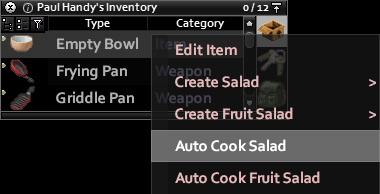
- An empty cooking vessel: This can be a Bowl, Frying Pan, or Griddle Pan.
- Accessible ingredients: Make sure the food items you intend to cook are within your character’s reach.
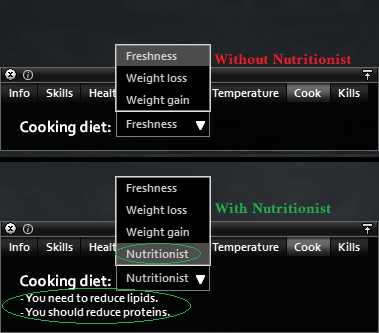
Once you have these items, navigate to your inventory, right-click on the chosen cooking container, and select the “Auto Cook” option. For more detailed control and specific recipe options, consult your Character Info Panel under the ‘Cook’ tab.
Important Considerations
While Auto Cook offers significant convenience, it’s important to be aware of its current limitations. The mod is designed to work with more complex, evolved recipes rather than simple, single-ingredient preparations. Additionally, it requires an empty container to begin; it cannot continue a cooking process that you have manually initiated.
The Auto Cook mod aims to reduce the time spent on mundane tasks, allowing you to dedicate more energy to exploration, combat, and fortifying your base. It’s a small quality-of-life improvement that can make a big difference in your day-to-day survival experience.