
Storage Quotas
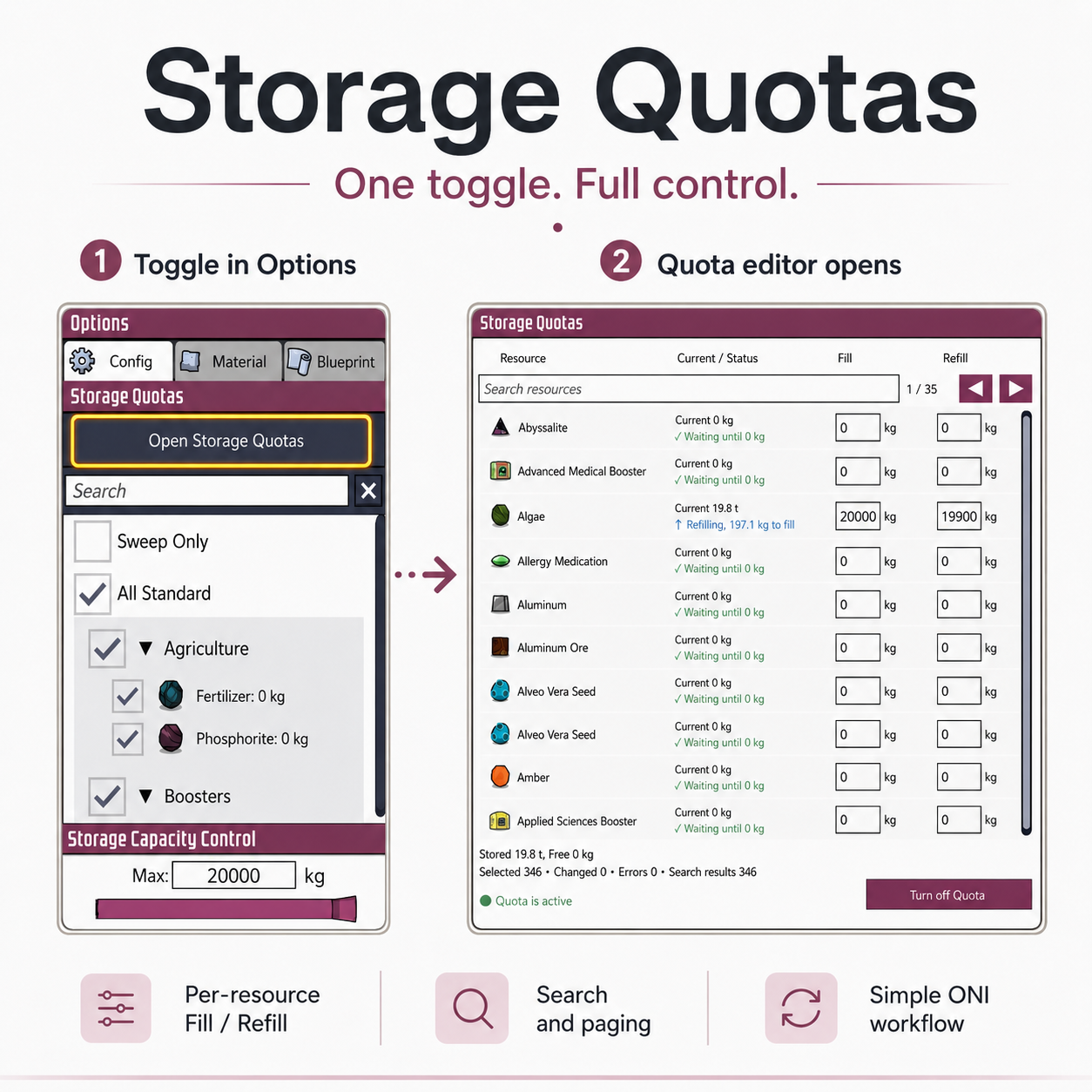
Master Your Duplicant Storage with Storage Quotas
Tired of your storage buildings overflowing with one resource while others sit empty? The Storage Quotas mod for Oxygen Not Included offers a precise solution, allowing you to dictate exactly how much of each individual resource your storage containers hold. This isn’t about increasing raw capacity; it’s about smart, granular control over your valuable materials.
Fine-Tune Your Inventory Management
Storage Quotas empowers you to designate specific amounts for multiple resources within a single storage unit. Imagine storing Iron Ore, Copper, and Coal all in one bin, but ensuring you always have a specific quantity of each readily available. This mod integrates seamlessly with existing Oxygen Not Included storage buildings, enhancing their functionality without altering their core mechanics.
Supported Storage Solutions
The following storage buildings are compatible with the Storage Quotas mod:
- Storage Bin
- Smart Storage Bin
- Ration Box
- Refrigerator
- Orbital Cargo Module
Once a compatible building is selected, you’ll find an “Open Storage Quotas” button in the standard Options panel, providing access to the intuitive editor.
Understanding Fill and Refill
At the heart of Storage Quotas are two key settings for each resource:
- Fill: This is your target quantity. Once the stored amount reaches this level, deliveries of that specific resource will cease.
- Refill: This acts as a reorder point. When the stored amount of a resource drops to or below this value, new deliveries will begin until the ‘Fill’ target is met.
For instance, setting ‘Fill’ to 1,000 kg and ‘Refill’ to 400 kg means deliveries will restart once the quantity falls below 400 kg and will stop once it reaches 1,000 kg. Note that the ‘Refill’ value cannot exceed the ‘Fill’ value. Setting both to the same number ensures immediate replenishment as soon as the target dips, perfect for critical supplies.
Key Features for Optimized Storage
- Utilize Existing Filters: Storage Quotas works in tandem with Oxygen Not Included’s built-in resource filters. Select your desired resources in the standard filter, and they’ll appear in the Quotas list for management.
- Precise Egress: If you reduce the ‘Fill’ amount for a resource that’s currently over the new target, the excess will be automatically removed from the storage building.
- Active Application: Settings are not active until you explicitly apply them by pressing ‘Shift + Enter’ or clicking ‘Turn on Quota’.
- Revert Anytime: Easily switch back to standard storage behavior by clicking ‘Turn off Quota’.
With Storage Quotas, managing your colony’s resources has never been more efficient.