
Mod List Previews
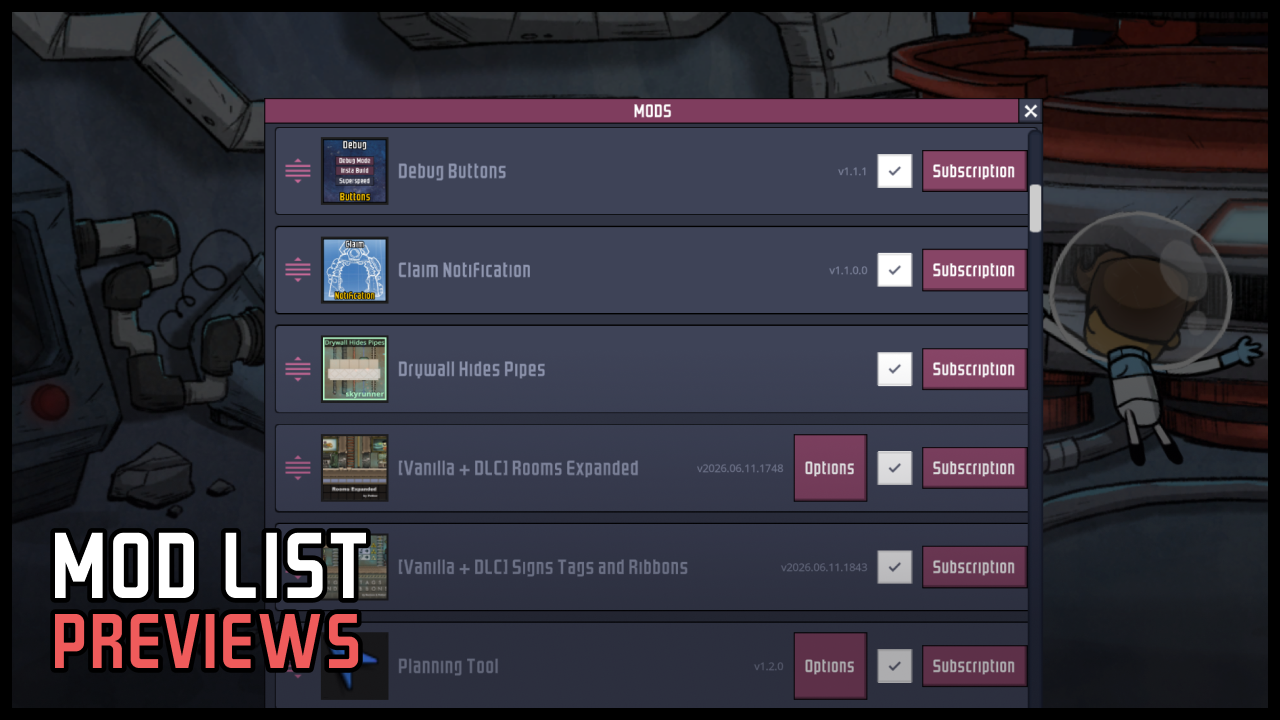
Enhance Your Oxygen Not Included Mod Management with Visual Previews
Navigating the ever-growing world of Oxygen Not Included mods can be a challenge. Keeping track of what each mod does, especially when you have a large collection installed, often relies on text descriptions and memory. This is where the Mod List Previews mod steps in, revolutionizing how you interact with your installed mods by bringing visual clarity directly into the game’s mod menu.
See Your Mods at a Glance
The core functionality of Mod List Previews is simple yet incredibly effective: it displays Steam Workshop cover thumbnails directly alongside each mod in the in-game list. This visual cue instantly helps you identify mods, reducing the time spent searching and confirming which mod is which. When a thumbnail isn’t readily available, a placeholder is shown, ensuring consistency across your mod list.
Intelligent Image Fetching
This mod employs a smart system to acquire and display your mod previews. It prioritizes using images already downloaded by Steam, then checks your local cache for stored previews. If neither is found, it will fetch the thumbnail from the Steam Workshop. For mods that are not on the Steam Workshop, such as local or development mods, the system intelligently looks for `preview.png` or `preview.jpg` files within the mod’s folder, allowing for custom visuals even for your personal creations.
Key Features for a Smoother Experience:
- Adds a clear cover thumbnail to the left of each mod entry.
- Utilizes a prioritized system for fetching images: Steam download > local cache > Workshop fetch.
- Supports custom preview images (preview.png/preview.jpg) for local and development mods.
- Automatically retries failed downloads when the mod list is reopened or the game is launched.
- Fully compatible with essential tools like Mod Profile Manager (MPM), including its pin and tag features.
Customization and Performance
Mod List Previews offers a degree of customization to suit your preferences. Within the mod’s settings, you can adjust the size of the cover thumbnails, ranging from a compact 32 pixels to a more prominent 128 pixels, with a default setting of 56 pixels. There’s also an option to manually refresh all covers, clearing the local cache and forcing a re-download of all images. For optimal performance, it’s recommended to fully quit and restart Oxygen Not Included after enabling or updating this mod. The visual previews will typically appear within a second or two the first time the mod list is loaded.