
World Menu Compactor
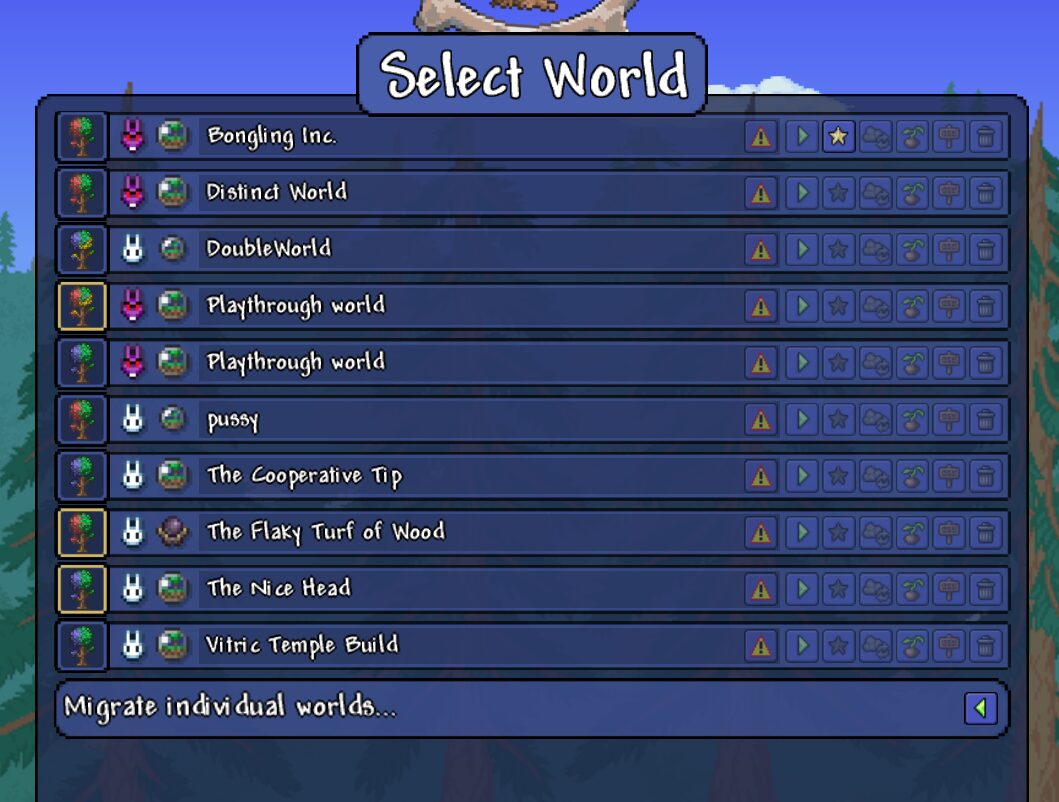
Streamline Your tModLoader Experience with World Menu Compactor
Tired of endlessly scrolling through a sprawling world selection screen in tModLoader? For players who delve into numerous worlds, managing a lengthy list can become a tedious chore. Fortunately, the World Menu Compactor mod offers a elegant and effective solution, transforming your world management experience into something far more streamlined and efficient.
Reclaim Your Screen Real Estate
The core functionality of World Menu Compactor is beautifully simple: it drastically reduces the vertical space each world entry occupies on your selection menu. Instead of each world taking up a significant portion of the screen, this mod shrinks them down, allowing many more worlds to be visible at once without the need for constant scrolling. This means you can quickly scan your available worlds, find the one you’re looking for, and jump back into the action faster.
Key Features for Enhanced Navigation
World Menu Compactor isn’t just about saving space; it’s about improving your overall interaction with the game’s world selection. Key features include:
- Significant reduction in the vertical size of world entries.
- Improved visibility of your entire world collection.
- Faster identification and selection of desired worlds.
- Seamless integration with tModLoader’s existing interface.
- Support for world seed icons, adding visual cues to your selection.
A Clientside Enhancement for All
This mod is a clientside addition, meaning it impacts only your local game experience without requiring any special setup for other players. It’s designed to be unobtrusive and enhance your personal tModLoader journey. Whether you’re a seasoned explorer with dozens of custom worlds or just starting to experiment, the World Menu Compactor mod provides a valuable quality-of-life improvement that makes navigating your tModLoader worlds more manageable and enjoyable.