
Wing Slot Extra
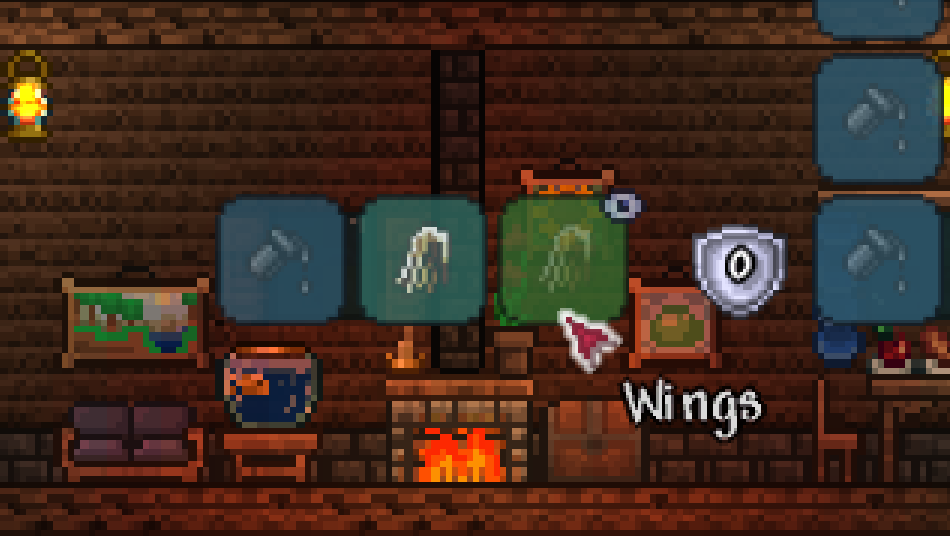
Unlock Your Character’s Potential with the Wing Slot Extra Mod for tModLoader
Are you tired of juggling your valuable accessories with the limited slots available in tModLoader? Do you dream of equipping the most stylish and functional wings without sacrificing crucial stat boosts? Introducing the Wing Slot Extra mod, a game-changing addition that brings dedicated wing management to your tModLoader experience.
A Dedicated Space for Your Wings
The Wing Slot Extra mod elegantly solves the common problem of accessory slot scarcity by introducing a brand-new, dedicated wing slot. This innovative feature integrates seamlessly into your inventory interface, appearing conveniently near your armor and accessory pages. No more difficult choices between essential gear and that coveted pair of celestial wings!
Intuitive Wing Management
Managing your wings has never been easier. The Wing Slot Extra mod offers a user-friendly system designed for quick and efficient use:
- Equipping Wings: Simply right-click any pair of wings from your inventory to instantly move them into the dedicated wing slot.
- Vanity Swapping: Need to switch between functional and cosmetic wings? Right-click your vanity wings to swap them with your currently equipped pair.
- Dye Integration: You can also left-click a wing or dye and then place it directly into the wing slot, allowing for easy customization.
- Visibility Control: Don’t want your wings displayed at all times? Left-click the eye icon on the equip slot to toggle their visibility on and off.
Customize Your Interface
The developers understand that every player’s interface preference is unique. That’s why the Wing Slot Extra mod includes options to reposition the wing slot to better suit your playstyle. Whether you prefer it nestled beside the defense icon or integrated into the accessory column, detailed guides are available to help you achieve your ideal layout, even via mod configuration settings.
Getting the Most Out of the Mod
For the Wing Slot Extra mod to function correctly, ensure it is enabled, up-to-date, and reloaded within tModLoader. If you encounter any issues, providing a portion of your client log will greatly assist in troubleshooting. The developers, with contributions from a dedicated community, are committed to refining the experience and fixing any bugs.