
Wiki in Game UI
Enhance Your tModLoader Experience with Wiki in Game UI
Navigating the vast and ever-expanding world of tModLoader can be a challenge. With countless items, complex crafting recipes, and numerous creatures introduced by various mods, keeping track of everything can feel overwhelming. Fortunately, the Wiki in Game UI mod is here to revolutionize how you access information, bringing the power of a comprehensive wiki directly into your game.
Seamless Integration, Instant Access
This innovative mod integrates a fully functional wiki directly within the tModLoader interface. No more alt-tabbing or searching external websites; all the information you need is readily available at your fingertips. Whether you’re a seasoned player or new to the tModLoader scene, Wiki in Game UI provides an unparalleled level of convenience.
Comprehensive Information at a Glance
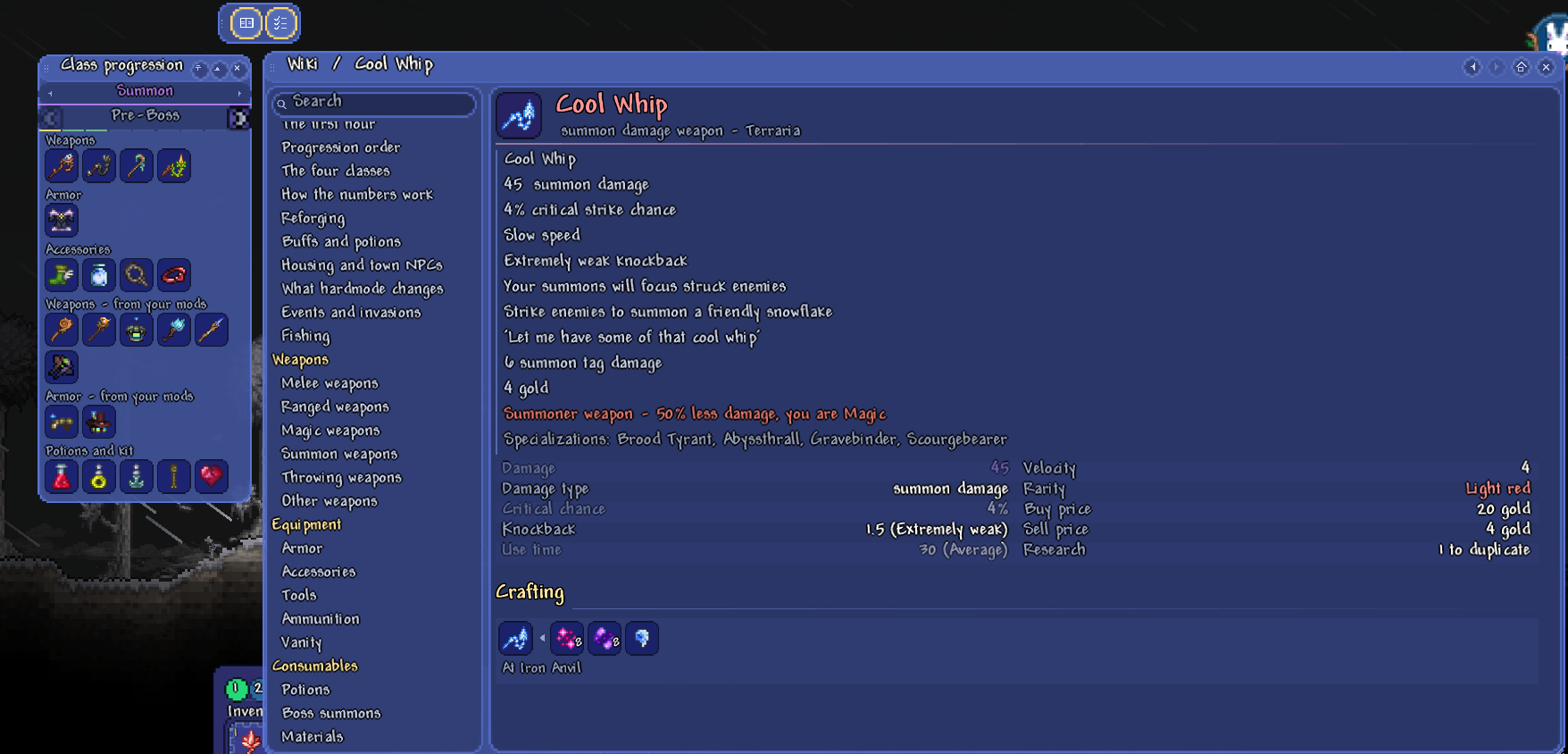
Wiki in Game UI meticulously gathers data from all loaded mods, creating detailed pages for every item, creature, and buff. You’ll find:
- Item Statistics: Full stats and precise tooltips for every item.
- Crafting Recipes: Complete breakdowns of how to craft any item, including those from mods.
- Source Information: Details on where to find items, including NPC vendors and enemy drop rates (with Expert and Master mode variations).
- Creature Data: Stats, Bestiary entries, habitats, and full drop tables for all enemies.
- Buff Details: Information on what each buff does and the items that grant them.
- Boss Information: Details on summoning items and treasure bags for all bosses.
Built for the Modded Community
Designed with modded tModLoader gameplay in mind, this mod excels at showcasing the content added by your favorite modifications. It features dedicated pages for each mod, listing its unique contributions, including bosses. A boss progression order page helps you track your journey through both vanilla and modded challenges. Crucially, modded tooltips are accurately displayed, ensuring you see the real-time generated information.
Intuitive Navigation and Search
Finding what you need is effortless. Search by name or by an item’s function, as descriptions are fully searchable. Filter any list by mod, rarity, damage class, or obtainability, allowing for precise information retrieval. A dedicated Class Progression panel guides you through preparing for upcoming challenges, automatically detecting your world’s progress and even ticking off items you own from your inventory.
User-Friendly Controls
Access the wiki with simple hotkeys (defaulting to F1 for the wiki, F2 for the progression panel, and F3 for hovering information), all of which are rebindable. The interface itself is drawn from tModLoader’s native artwork, ensuring it blends seamlessly with your game’s aesthetic and even adapts to resource packs.