
Item Checklist
Master tModLoader Item Collection with the Item Checklist Mod
For tModLoader players dedicated to completing their item collections, the Item Checklist mod is an indispensable tool. This powerful modification provides a comprehensive and easily accessible way to track every item available in the game, whether your goal is to collect them all or craft them from scratch. Gone are the days of haphazardly jotting down notes or relying on memory; Item Checklist brings order and clarity to your item hunting endeavors.
Effortless Navigation and Customization
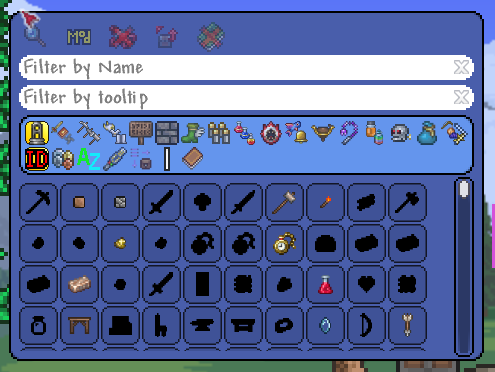
Accessing the checklist is as simple as pressing a hotkey, which you can assign yourself within the game’s settings for ultimate convenience. Once open, you’ll find an intuitive interface designed for efficiency. At the top, a series of buttons and search filters allow you to quickly narrow down your view. Below this, a category selection panel lets you delve into specific areas of the game’s vast item pool.
Key Features for the Dedicated Collector:
- Filter by Acquisition Status: Easily toggle between viewing all items, only those you’ve found, or a list of items you still need to acquire.
- Mod and Vanilla Separation: Filter your checklist to see only vanilla items, items from specific mods you have installed, or a complete overview of everything.
- Toggle In-Game Notifications: Choose whether or not you want to receive chat messages when you pick up a new item, keeping your gameplay experience streamlined.
- Chest Item Counting: Decide if items discovered within chests should count towards your collection progress.
- Enhanced Sorting Options: Display additional sorting information directly on items, helping you understand the chosen sort order at a glance.
Advanced Filtering and Sorting
Beyond the primary filters, Item Checklist offers powerful search capabilities. You can filter by item name to pinpoint specific items, or even search within item tooltips. Looking for all items related to “minions”? A simple tooltip search will reveal them. The interface also allows for easy selection of categories and sub-categories, with flexible sorting options. Choose to sort by item ID, value, alphabetical order, rarity, or even a specialized chest auto-sorting algorithm. Simply use your mouse wheel to navigate through these extensive panels.
For those using complementary mods like Magic Storage, Item Checklist integrates seamlessly. With chest item counting enabled, accessing your Magic Storage will automatically update your collection status for any items within. Furthermore, integration with Recipe Browser allows you to query hovered items directly from the checklist, streamlining your crafting process. Item Checklist is the ultimate companion for any tModLoader player aiming for 100% item completion.