
Camera Control
Unleash Cinematic Potential with Camera Control for tModLoader
Elevate your tModLoader experience with Camera Control, a powerful mod designed to transform how you capture gameplay. Whether you’re aiming to create stunning showcase videos, intricate cinematic sequences, or engaging YouTube content, this mod provides the tools you need to direct the action like never before.
Craft Dynamic Camera Movements
Camera Control empowers you to meticulously plan and execute complex camera movements. Move beyond static perspectives and bring your tModLoader world to life. You can define precise paths for your camera to follow, lock it onto a specific point of interest, or even have it dynamically track NPCs, items, or projectiles.
Intuitive Editor Mode
Getting started is straightforward. Enter the dedicated Editor mode using a customizable keybind. Once inside, you’ll gain free reign over the camera. Utilize standard movement keys (W, A, S, D) to navigate and the mouse wheel to zoom in and out, giving you granular control over your viewpoint. A helpful “Show View Range” option displays a visual guide, indicating what players will see at 100% zoom, ensuring your shots are perfectly framed.
Path Creation and Customization
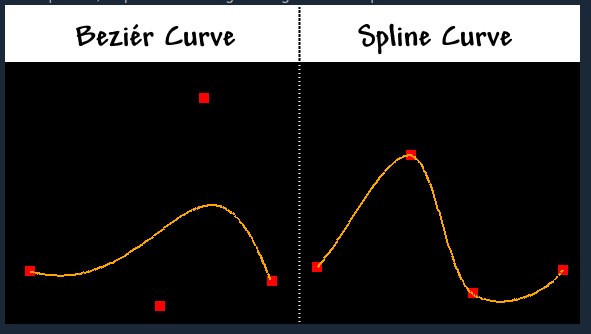
The core of Camera Control lies in its robust path creation system. Choose between two distinct curve types:
- Bézier Curves: Offer smooth, flowing paths where the camera motion is influenced by control points without necessarily passing directly through them.
- Catmull-Rom Splines: Ensure the camera path precisely follows every control point you set, providing absolute accuracy for your desired trajectory.
After selecting your curve type, simply click and drag to draw your path. You can then switch back to Select mode to fine-tune the curve by adjusting control points. Erasing individual curves or clearing them all is also easily managed.
Advanced Control and Features
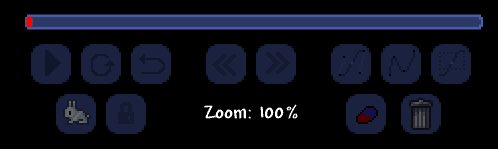
Once your path is set, initiate playback to see your camera glide along its predetermined route. Control the camera’s behavior at the end of its journey with options to stop, seamlessly repeat the path, or create a dynamic “bounce” effect, reversing direction. Fine-tune the pacing using the speed adjustment buttons and establish keyframes to dictate precise speed changes at specific points along the path. For even greater immersion, the “Track Entity” feature allows your camera to follow selected in-game elements, while the “Lock Camera” option keeps the camera fixed at your editor’s viewpoint upon exiting Editor mode.