
Lemegeton Wisp List
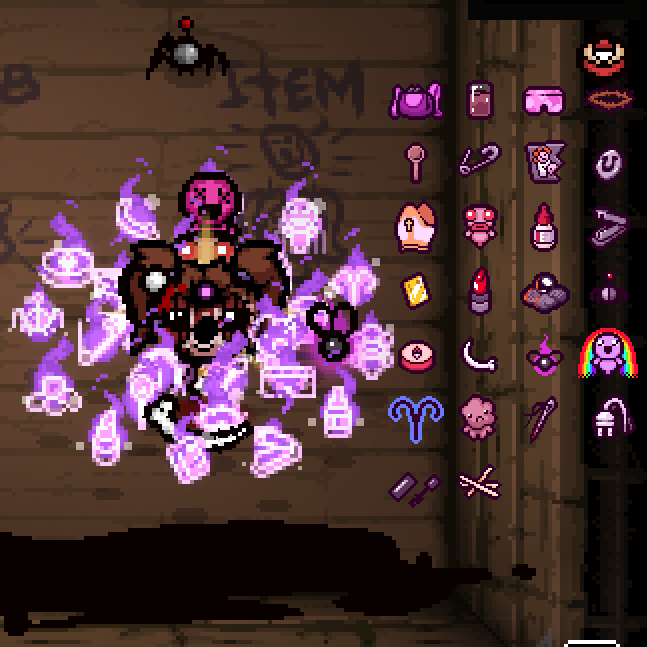
The Lemegeton Wisp List Mod for The Binding of Isaac: Rebirth
Are you a dedicated player of The Binding of Isaac: Rebirth who finds themselves constantly trying to keep track of the various Lemegeton wisps you’ve accumulated? This powerful new mod, the Lemegeton Wisp List, is designed to eliminate that guesswork and streamline your gameplay experience.
Never Lose Track of Your Wisps Again
The Lemegeton Wisp List mod introduces a highly requested feature: a clear and concise display of all your active Lemegeton item wisps. Simply hold down the tab key, and a dedicated interface will pop up, showing you exactly which wisps you have available. This is invaluable for making strategic decisions during your runs, ensuring you’re always aware of the buffs and abilities at your disposal.
Key Features and Compatibility
This mod boasts a range of features designed for maximum utility and seamless integration into your game:
- Displays all Lemegeton item wisps when the ‘tab’ key is held.
- Fully compatible with wisps obtained from any source, including those from other mods.
- Offers two distinct display modes, customizable through the Mod Config Menu.
- Designed to be co-op compatible, so all players can benefit.
- Automatically matches your existing HUD offset for a clean look.
- Features an adjustable vertical offset, controllable via the ‘+’ and ‘-‘ keys.
Enhanced Mod Integration
One of the standout aspects of the Lemegeton Wisp List is its broad compatibility. It doesn’t matter how you acquire your Lemegeton wisps; whether they come from vanilla game items or from other modifications you have installed, this mod will accurately track and display them. This makes it an essential addition for anyone looking to deepen their understanding and control over their Lemegeton-based builds.
Customization at Your Fingertips
Understanding that players have different preferences for their in-game interfaces, the Lemegeton Wisp List offers a degree of customization. Beyond the two display modes, players can fine-tune the vertical placement of the wisp list. While the mod API currently doesn’t allow for automatic mapping of HUD offsets, the intuitive ‘+’ and ‘-‘ controls provide an easy way to ensure the list doesn’t obstruct other important game elements, such as the map.