
AEBS Weather Fix
Project Zomboid: AEBS Weather Broadcast Fix Mod
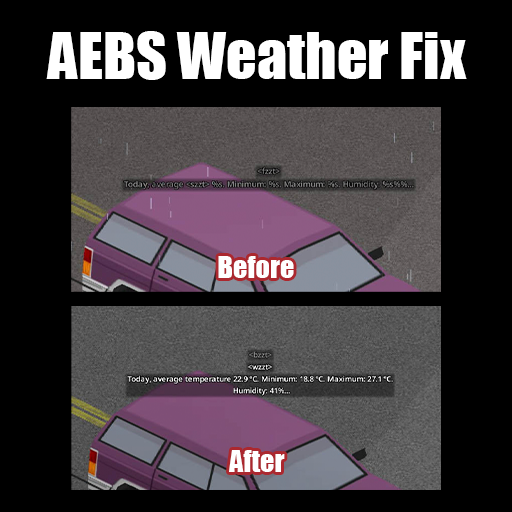
Encountering garbled weather reports in Project Zomboid? If you’re running Build 42.15, you might have noticed the Automated Emergency Broadcast System (AEBS) displaying unhelpful text like “Today, average temperature %s. Minimum: %s.” instead of actual meteorological data. This frustrating bug has been a thorn in the side of many survivors, making it difficult to prepare for changing conditions. Fortunately, the AEBS Weather Fix mod is here to restore clarity to your in-game radio broadcasts.
Restoring Clear Weather Information
This essential mod directly addresses a bug introduced in Build 42.15 that causes the AEBS to show raw format placeholders instead of crucial details like temperature, humidity, and wind speed. Before this fix, survivors had to decipher cryptic messages, potentially leading to unpreparedness for hazardous weather. The AEBS Weather Fix ensures that your radio broadcasts display information in a human-readable format, providing accurate data such as “Today, average temperature 15.2 °C. Minimum: 10.5 °C. Maximum: 20.1 °C. Humidity: 65%.”
Key Features of the AEBS Weather Fix
- Automatic Disabling: The mod intelligently detects when the underlying issue is resolved in future game updates. It will automatically switch to a passthrough mode, meaning it won’t interfere with gameplay even if you forget to unsubscribe.
- Universal Language Support: This mod works flawlessly with all game languages. It corrects the display issue without altering any translation files, ensuring a seamless experience regardless of your chosen language.
- Lightweight Performance: Designed with efficiency in mind, this mod features a minimal implementation that only overrides a single game function, ensuring it has virtually no impact on your game’s performance.
Compatibility and Verification
The AEBS Weather Fix mod is compatible with Build 42.15 and later versions of Project Zomboid. It functions correctly in both singleplayer and multiplayer environments and has no conflicts with other mods, as it only modifies the `getRadioText` function. To verify that the mod is active and functioning, you can check your game’s console or log file for specific messages indicating whether the bug was detected and fixed.