
Show Oceanfish
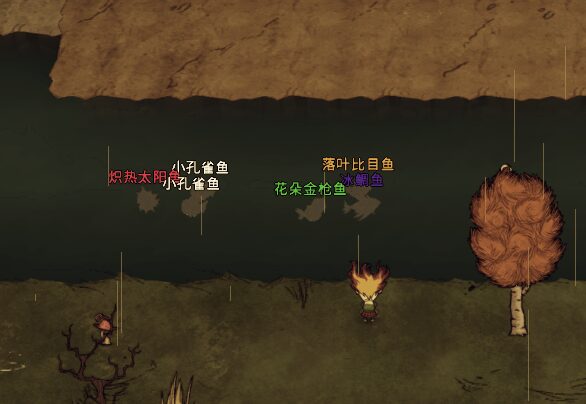
Enhance Your Don’t Starve Together Fishing Experience with Show Oceanfish
Tired of the guesswork when it comes to ocean fishing in Don’t Starve Together? The Show Oceanfish mod is here to revolutionize your angling adventures, providing essential information directly on your screen and offering an optional automated fishing experience.
Understand Your Catches Instantly
This client-side mod eliminates the mystery of what lurks beneath the waves. With Show Oceanfish, the names of the ocean fish you encounter will be clearly displayed, allowing you to make informed decisions about what to reel in. The mod offers extensive customization, letting you fine-tune the text size and vertical offset to perfectly suit your preferred interface. Furthermore, you can even assign specific colors to fish schools based on the current season, adding another layer of visual clarity to your fishing endeavors.
Strategic Display Options
Take control of when and how you see this valuable information. Show Oceanfish includes a convenient hotkey system that allows you to toggle the display states on the fly. This means you can keep your screen clean during exploration and activate the fish names only when you’re actively fishing, minimizing visual clutter. By default, the display is turned off, but a simple key press brings up the vital details whenever you need them.
Key Features at a Glance:
- Displays ocean fish names directly on screen.
- Customizable text size and vertical offset.
- Optional seasonal color-coding for fish schools.
- Hotkey support for toggling display states.
- Reduces computational load for improved performance.
Introducing Auto Oceanfishing
For those seeking an even more streamlined experience, the Show Oceanfish mod introduces an optional Auto Oceanfishing feature. This powerful tool can be enabled through the mod’s configuration menu and automatically completes the fishing process once a fish bites your hook. You have the flexibility to choose from three distinct modes via a hotkey:
- Aggressive Mode (♥): Prioritizes speed for quicker catches, though it may carry slightly more risk.
- Conservative Mode (♡): Offers a slower but safer approach to ensure successful hauls.
- Disabled: The feature is turned off, and you’ll manage the fishing process manually.
This Auto Oceanfishing functionality is disabled by default, ensuring that players can ease into its use and choose when to activate it.