
Gesture Wheel
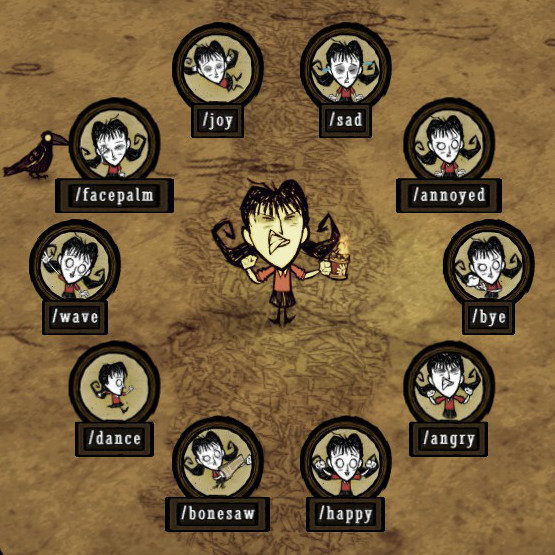
Express Yourself: The Gesture Wheel Mod for Don’t Starve Together
Ever found yourself wanting to communicate more effectively with your fellow survivors in Don’t Starve Together? Whether you need to signal danger, express gratitude, or just share a laugh, the Gesture Wheel mod offers a streamlined and intuitive way to access your character’s full range of emotes. Say goodbye to clunky menus and hello to seamless in-game communication.
Effortless Emoting
The core of the Gesture Wheel mod is its elegant radial interface. By default, pressing and holding the ‘G’ key brings up a visually appealing wheel. Simply glide your mouse cursor in the direction corresponding to the emote you wish to perform, and release the key. Your character will instantly execute the chosen gesture, making it easier than ever to convey a message without missing a beat in the fast-paced world of Don’t Starve Together.
For those who prefer a controller, the experience is equally fluid. Pressing in the left analog stick activates the wheel, allowing you to select gestures by moving the stick while it remains pressed. Releasing the stick confirms your choice, ensuring your communication is both quick and precise.
Customization at Your Fingertips
This mod isn’t just about ease of use; it’s about personalization. The Gesture Wheel mod provides a wealth of configurable options to tailor the experience to your playstyle:
- Toggle Button: Customize the keybind for activating the wheel, moving beyond the default ‘G’ to any letter key that suits your preference.
- Wheel Size: Adjust the visual scale of the gesture wheel, from a subtle overlay to a more prominent display.
- Display Options: Choose whether to show just the emote icons, the corresponding text labels, or a combination of both for maximum clarity.
- Wheel Centering: Decide if the wheel should appear centered on your mouse cursor or at the middle of the screen.
- Cursor Position Restore: Fine-tune how your mouse cursor behaves after selecting a gesture, offering options for relative, absolute, centered, or no cursor movement.
- Controller Stick: Select whether the left or right analog stick controls gesture selection on a gamepad.
- Emote Limit: Optionally limit the wheel to the 8 most essential emotes to prevent overcrowding, with specific options to assign gestures to various wheel segments.
Enhance Your Social Gameplay
With the Gesture Wheel mod, coordinating with your friends and expressing yourself during gameplay has never been more intuitive. Dive into the customization options and find the perfect setup for your Don’t Starve Together adventures. Whether you’re navigating treacherous caves or surviving the harshest seasons, clear and immediate communication is key, and this mod delivers.