
DST Mod Publisher
Streamline Your Don’t Starve Together Modding with DST Mod Publisher
Creating and sharing your own mods for Don’t Starve Together can be a deeply rewarding experience. However, the process of uploading and managing those mods on the Steam Workshop can sometimes feel like navigating a minefield. Frustrating errors, lost work, and cumbersome updates can detract from the joy of modding. Fortunately, a powerful community tool, DST Mod Publisher, is here to revolutionize your workflow. This advanced uploader acts as a direct replacement for the official tool, offering a host of enhancements designed to make mod publishing smoother, faster, and more intuitive.
Say Goodbye to Common Modding Headaches
The official mod uploader, while functional, has long been a source of frustration for Don’t Starve Together mod creators. Anyone who has experienced the pain of losing their meticulously crafted description after a single failed upload will appreciate the improvements DST Mod Publisher brings. Imagine the annoyance of having to re-upload your entire mod just to fix a minor typo in the description, or struggling to write BBCode in a basic, unpreviewed text box. DST Mod Publisher addresses these issues head-on, transforming the publishing experience.
Key Features Designed for Modders
DST Mod Publisher is packed with features that cater specifically to the needs of Don’t Starve Together mod creators:
- Effortless Setup: Requires no complex installation or login credentials beyond having Steam running and owning Don’t Starve Together.
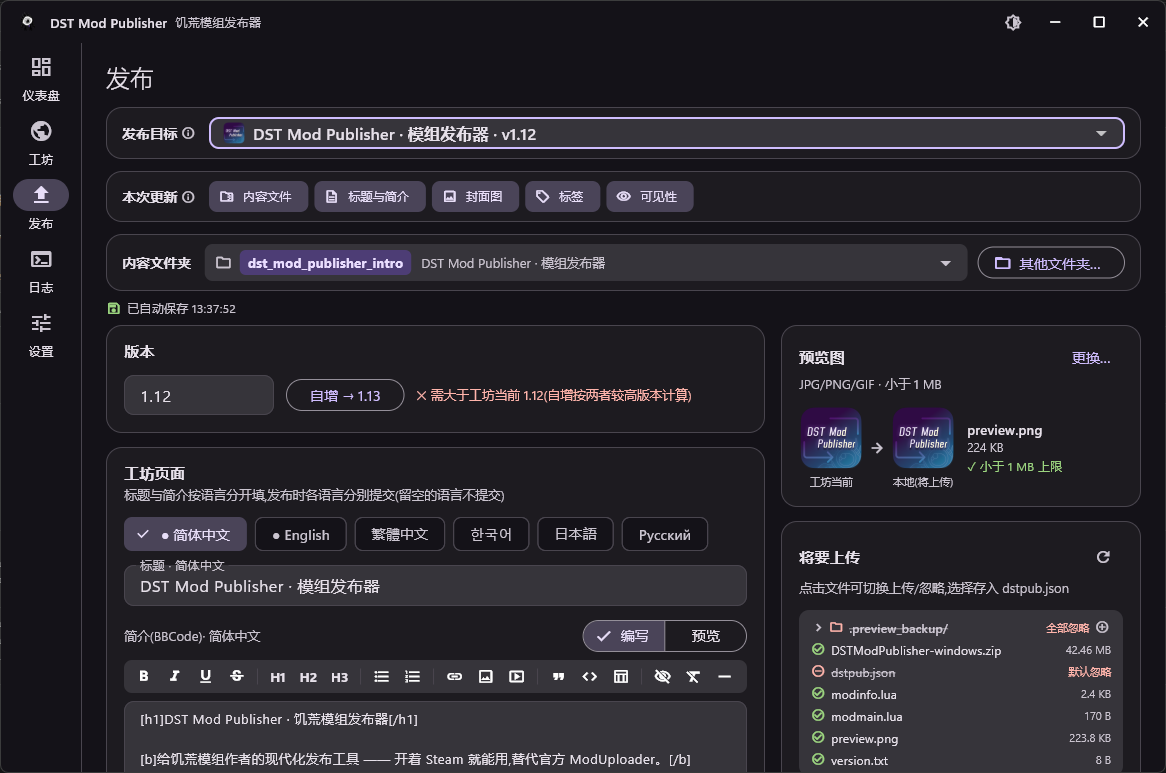
- Draft Autosave: Never lose your work again. Your description drafts are saved automatically, allowing you to easily resume and retry after any upload issues.
- Multi-Language Support: Craft titles and descriptions in multiple languages directly within the tool, mirroring the Steam backend’s capabilities.
- Interactive BBCode Editor: Write and preview your descriptions with live feedback, ensuring your formatting is perfect before publishing.
- Selective Updates: Choose precisely what you want to update – content files, descriptions, preview images, or tags – leading to much faster update cycles.
- Integrated Change Notes: Easily add changelogs that appear directly in the official “Change Notes” tab on the Steam Workshop.
- Smart File Uploads: Excludes unnecessary files like source code and archives by default, with the ability to toggle individual files for upload and support for .modignore rules.
- Version Automation: Automatically bumps the mod version in `modinfo.lua`, preventing silent update failures and ensuring consistency.
- Enhanced Workshop Overview: Manage all your workshop items from a single, clear interface, including quick access to subscriptions, favorites, and comments.
- User-Friendly Error Reporting: Understand upload errors clearly with plain-language explanations and suggested fixes for EResult codes.
Publishing Made Simple
Getting started with DST Mod Publisher is straightforward. Once you have Steam running, simply run the publisher executable. You can then select your mod’s directory and begin updating or publishing your creations. The tool even includes features like automatic `mod.manifest` generation for faster asset loading and self-updating capabilities, ensuring you’re always using the latest improvements. For modders looking to elevate their Don’t Starve Together creations, DST Mod Publisher is an indispensable asset.