
Title replaced with Girls Dungeon【标题改为少女地牢】
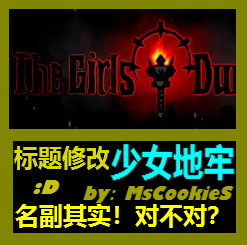
Transform Your Darkest Dungeon Experience with Girls Dungeon
Prepare to embark on a visually distinct journey into the oppressive darkness of the Darkest Dungeon. The “Girls Dungeon” mod offers a unique aesthetic overhaul, replacing key interface elements to give your perilous expeditions a fresh, yet still appropriately grim, appearance. This modification focuses on altering the game’s title screen and potentially other visual aspects of the user interface, providing a subtle but impactful change for players seeking a new perspective on the familiar horrors.
Aesthetic Redesigned
The core appeal of the “Girls Dungeon” mod lies in its thematic visual transformation. By replacing the game’s default title, it immediately sets a different tone for your descent into madness. While the core gameplay mechanics and challenging encounters remain untouched, the visual wrapper is updated, offering a novel way to engage with the game world. This mod is perfect for those who appreciate the intricate details of game presentation and wish to experience their Darkest Dungeon sessions with a modified aesthetic.
Key Features of the Girls Dungeon Mod:
- Replaces the main game title with a new visual representation.
- Offers a unique aesthetic shift for the Darkest Dungeon interface.
- Provides a fresh visual perspective without altering core gameplay.
- Designed for players who enjoy cosmetic modifications.
Installation Guide
Implementing the “Girls Dungeon” mod is a straightforward process for dedicated adventurers. Once you have subscribed to the mod through your preferred platform, you will need to locate its files within your game’s workshop directory.
The general path for these files is typically found within:
`SteamLibrarysteamappsworkshopcontent262060`
Within this directory, you will find the specific files belonging to the “Girls Dungeon” mod. The instructions indicate that you should copy the designated `.fx` file(s) and paste them directly into your main Darkest Dungeon game installation folder. The standard location for this is:
`SteamLibrarysteamappscommonDarkest Dungeon`
If the installation is successful, the next time you launch Darkest Dungeon, you should observe the replaced title screen, signifying that the mod is active and ready to enhance your playthrough. Enjoy your altered journey into the depths!