
Font Replacement Example
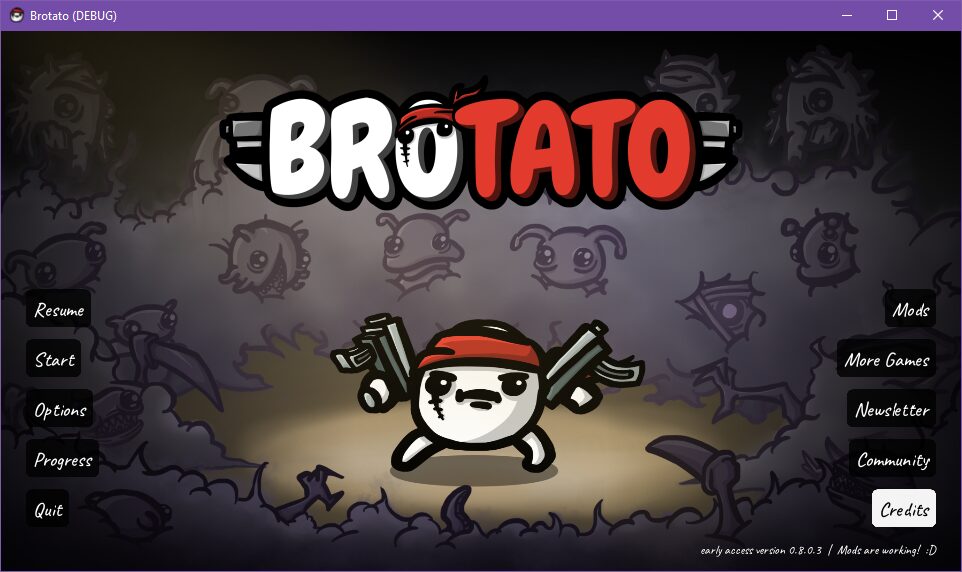
Elevate Your Brotato Interface with a Custom Cursive Font
A Touch of Elegance for Your Brotato Experience
Tired of the standard text in Brotato? This innovative mod offers a unique solution, replacing the game’s default font with a beautifully crafted cursive typeface. Imagine navigating menus, reading item descriptions, and keeping track of your stats with a touch of personal flair and elegance. This mod is more than just a cosmetic change; it’s an opportunity to personalize your Brotato gameplay and add a distinctive visual style.
Understanding the Font Replacement Mod
This mod serves as a prime example of how to inject custom assets into Brotato. Developed as a proof of concept, it clearly demonstrates the process of swapping out the game’s built-in font for an entirely different one. For those interested in the technical aspects or looking to create their own font-based modifications, the developer has provided extensive information on their GitHub page. This resource is invaluable for aspiring modders seeking to understand the mechanics behind customizing Brotato’s visual elements.
Key Features and Benefits:
- Replaces the default Brotato font with a custom cursive style.
- Offers a unique and personalized visual experience for players.
- Serves as an educational example for aspiring Brotato modders.
- Provides access to detailed technical information via a GitHub repository.
- Enhances the aesthetic appeal of menus, item text, and in-game information.
A Glimpse at the Caveat Font
The specific font chosen for this demonstration is “Caveat,” a delightful cursive font sourced from Google Fonts. Caveat brings a friendly yet sophisticated feel, ensuring readability while adding a noticeable stylistic upgrade. This choice highlights the potential for players to integrate high-quality, readily available fonts into their Brotato sessions, transforming the look and feel of the entire game interface.