
Friendly Target UI
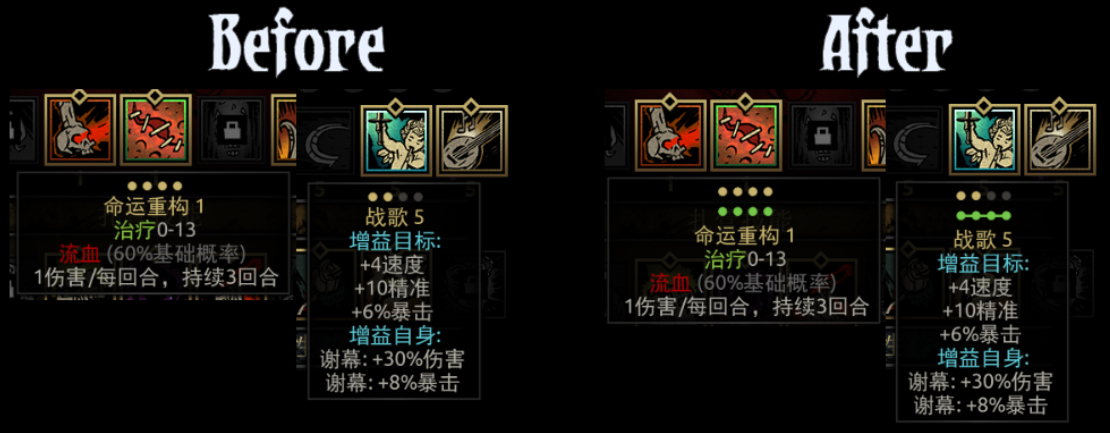
Enhance Your Darkest Dungeon UI with Friendly Target Displays
Navigating the treacherous depths of the Darkest Dungeon can be a challenging ordeal. Every decision matters, and clear information is paramount to survival. For those seeking to refine their user interface and gain a crucial edge, the Friendly Target UI mod offers a significant improvement, specifically designed to clarify the targeting of your heroes’ supportive abilities.
Clarifying Supportive Skill Targeting
This mod focuses on a singular, yet vital, aspect of gameplay: visualizing the targets for friendly skills. Often, the subtle nuances of targeting for buffs, heals, or other supportive actions can be difficult to discern at a glance, especially during the heat of battle. The Friendly Target UI mod introduces more intuitive and aligned target indicators, ensuring you can effortlessly see precisely who or what your heroes are affecting with their beneficial abilities.
Key Features and Benefits
The primary goal of this mod is to enhance player clarity and reduce misinterpretations during combat. By implementing these visual aids, players can expect:
- Improved visual feedback for friendly skill targeting.
- Reduced risk of accidentally targeting the wrong ally.
- A more streamlined and intuitive combat experience.
- Enhanced awareness of ability synergies and positioning benefits.
Future Expansions and Community Contributions
While currently focused on vanilla hero abilities, the developers have ambitious plans to expand this mod’s compatibility. Future updates aim to incorporate friendly skill target displays for a variety of popular modded heroes available on the workshop. Furthermore, the mod actively encourages community involvement. If you utilize other hero mods and find their friendly skills lack clear targeting indicators, you can submit the relevant skill entries to the mod author for potential inclusion in future updates. This collaborative approach ensures the mod grows to support an ever-wider range of player experiences.
Installation Notes
To ensure proper functionality, it is crucial to place this mod at the very top of your mod loading order. Additionally, manual file replacement is required. Please follow the provided instructions carefully to integrate the necessary font files for the mod to operate correctly.